Account Linking (DiscordSRV)
To ensure a safe and connected community, you must link your Discord account before you can join the Minecraft server.
To join the server, you must follow this 3-step process: Join (to get a code), Link (on Discord), and Rejoin.
1. Get Your Code
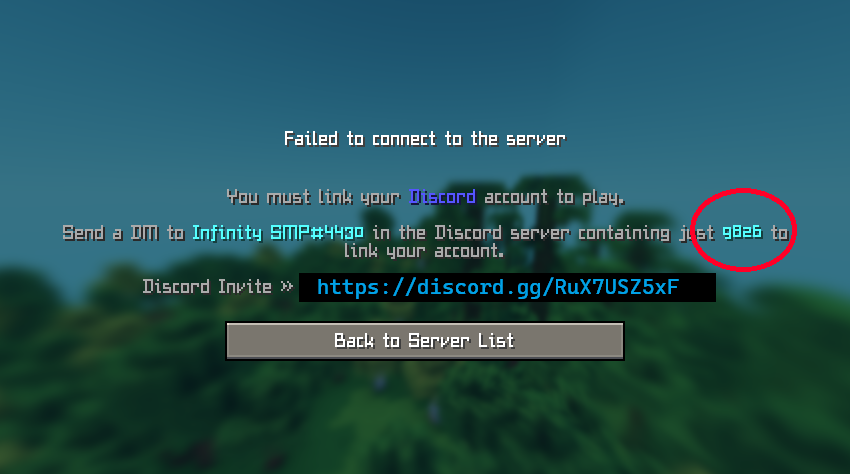
Section titled “1. Get Your Code”First, try to join the Minecraft server at mc.mishl.dev. Since you aren’t linked yet, you will be automatically kicked and shown a 4-digit code.
2. Link on Discord
Section titled “2. Link on Discord”Once you have your code, head over to our Discord and find the bot to link your account.
-
Join our Discord: If you haven’t already, join the official Infinity SMP Discord.
-
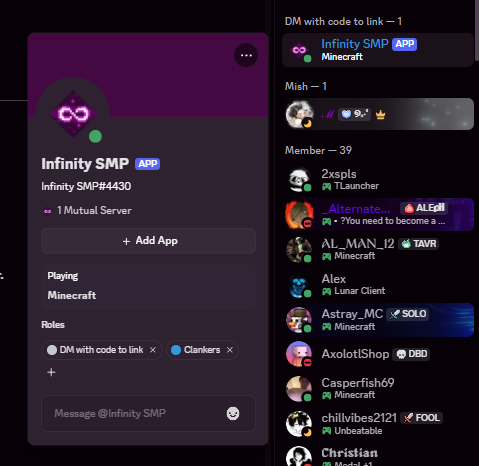
Find the Bot: Look for Infinity SMP#4430 in the member list or DM list.
-
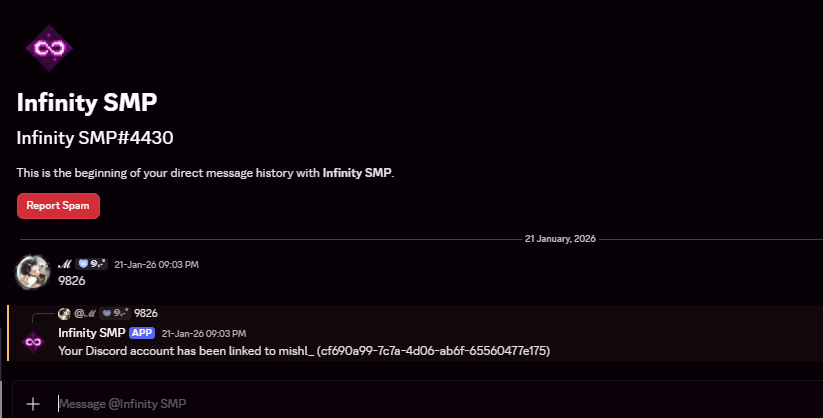
Message the Code: Send a Direct Message (DM) to the bot containing only the 4-digit code you got from the kick screen.
3. Rejoin and Play
Section titled “3. Rejoin and Play”Once the bot confirms your account is linked, you can now join the Minecraft server! Your rank and roles will sync automatically.
Benefits of Linking
Section titled “Benefits of Linking”- Sync Ranks: Your Discord roles and Minecraft ranks stay in sync.
- Cross-Chat: Talk to players in-game directly from Discord.